API
Chatter Surveys exposes a REST API that allows programmatic access to your account data — companies, locations, surveys, solicitations, and more.
To use the API, you need to generate a personal API key from your profile page and include it in every request.
Generating an API Key
- Log in to your Chatter Surveys account.
-
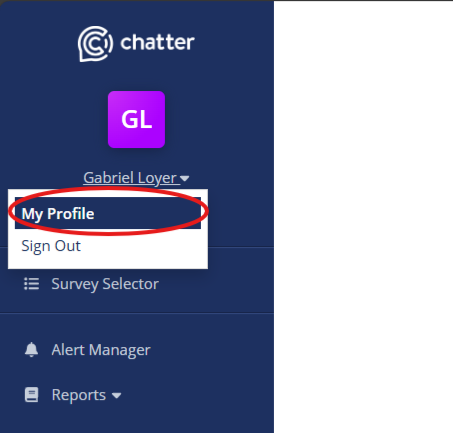
Click your name to open the account menu, then select My Profile.
-
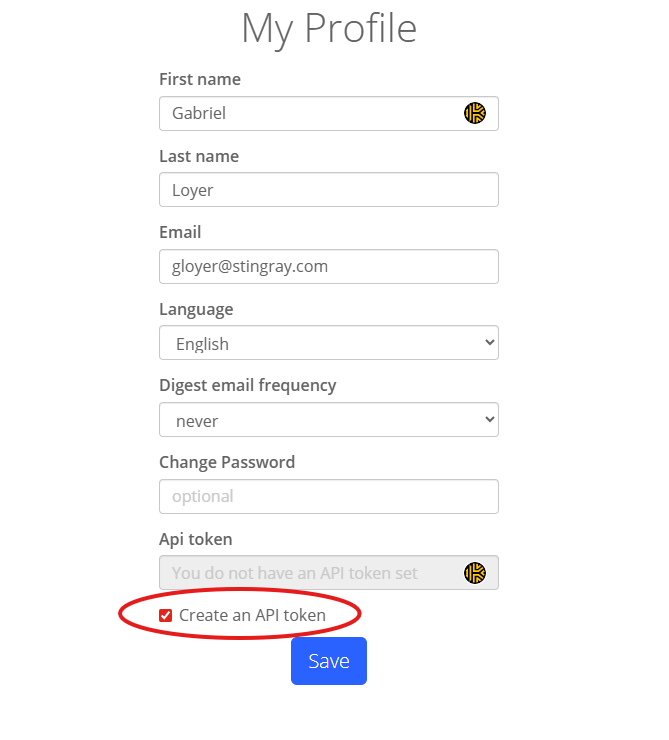
On the My Profile page, find the Api token section. Check Create an API token, then click Save.
-
After the page updates, your new token is shown in the Api token field. Copy the token using the copy control next to it, or select the value and copy it manually.
To revoke an existing token, use the control on the same profile section (for example Delete or clearing the token, depending on your account). You can create a new one by repeating the steps above.
Using the API Key
Include your token in the Api-Token HTTP header on every API request:
Api-Token: <YOUR_API_TOKEN>
Example — list companies you have access to:
curl -H "Api-Token: <YOUR_API_TOKEN>" https://api.chatterresearch.com/api/v1/companies
API Reference
The full list of available endpoints, parameters, and response schemas is documented in the interactive Swagger UI.